
RAG Implementation Timeline in 2026: A 30-60-90 Day Plan for Enterprise Teams

Most enterprise RAG projects do not fail because retrieval is impossible. They fail because leaders buy a six week fantasy and discover halfway through that data access, governance, evaluation, and adoption were never scoped properly.
If you are trying to estimate a RAG implementation timeline in 2026, the blunt answer is this: a serious enterprise deployment usually needs around 90 days to move from scoped pilot to controlled production readiness, and that assumes the team already has an executive owner, usable source content, and at least a tolerable security review process.
Could a vendor demo something in two weeks? Sure. Could your team put a chatbot on top of a few PDFs in ten days? Also yes. That is not the same thing as a production RAG system that sales, operations, support, or internal knowledge teams can trust.
This article gives you a practical 30-60-90 day plan for enterprise RAG implementation. It covers what actually happens in each phase, what slows teams down, where the costs show up, and how to avoid building a polished hallucination machine that nobody wants to own.
Why timeline estimates for RAG are usually wrong
The first mistake is treating RAG like a model problem only. It is really a systems problem. Retrieval quality depends on document hygiene, chunking strategy, metadata structure, access control, feedback loops, prompt orchestration, and evaluation discipline.
The second mistake is underestimating organizational drag. AWS and Harvard Business Review research published in the 2025 CDO Agenda found that 52% of organizations rated their data foundation readiness for generative AI as inadequate. That single number explains a lot. Teams say they are implementing AI, but what they are actually doing is discovering that their data is duplicated, stale, inaccessible, poorly permissioned, or trapped in systems nobody wants to touch.
The third mistake is expecting ROI before instrumentation exists. Forrester noted in 2025 that while two-thirds of AI decision-makers said their organizations were using genAI in production, only 15% reported a positive impact on earnings, and just about one-third could connect AI spend to profit and loss. If you launch RAG without baseline metrics, you will spend months arguing about vibes.
That is why the right planning unit is not just build time. It is build time plus review time plus adoption time.
What a realistic enterprise RAG timeline looks like
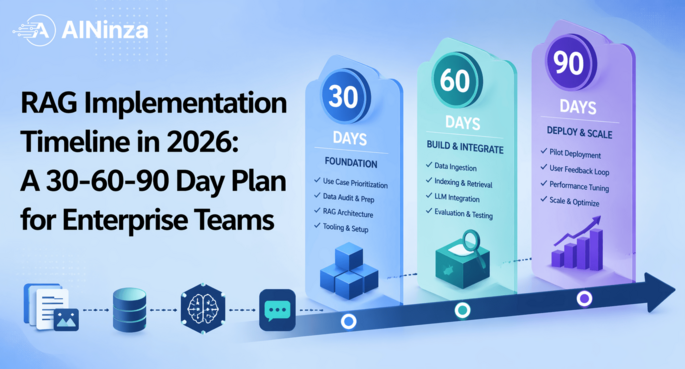
For most mid-market and enterprise teams, the realistic path looks like this:
- Days 1-30: Scope, source audit, architecture decisions, security alignment, and success metric definition
- Days 31-60: Pipeline buildout, retrieval tuning, prompt and evaluation loops, pilot content ingestion, and user testing
- Days 61-90: Governance hardening, access control, production monitoring, rollout sequencing, and KPI review
A smaller internal knowledge assistant may move faster. A customer-facing, regulated, or multi-system deployment will often take longer than 90 days. NIST’s Generative AI Profile makes this painfully clear. Trustworthiness, documentation, human oversight, and testing are not optional extras. They are part of the delivery timeline whether you acknowledge them up front or get ambushed by them later.
Day 1 to 30: Decide what the system is actually for
1. Pick one business workflow, not five
The cleanest RAG implementations start with one bounded workflow. Good first targets include:
- Internal support knowledge lookup
- Sales enablement document search
- SOP and policy retrieval for operations teams
- Contract or compliance knowledge navigation
- Customer service agent assist
Bad first targets are usually vague mandates like “enterprise knowledge AI” or “a chatbot for the whole company.” That is how timelines turn into soup.
At this stage, define:
– Primary user group
– Top 10 user questions
– Systems that hold the source knowledge
– Required freshness cadence
– Access restrictions
– Failure tolerance
– Target business KPI
If the team cannot answer those seven items clearly, the project is not ready for sprint planning.
2. Audit the source content before touching the stack
This is the unglamorous work that saves months later. Review:
- How many documents or records actually matter
- File formats and consistency
- Duplicate or outdated content
- Metadata quality
- Ownership of each source system
- Permission models and exceptions
Stanford HAI’s 2025 AI Index shows how quickly enterprise AI adoption is accelerating, but adoption is not the same as readiness. In practice, the bottleneck is often content chaos. A retrieval system built on bad content simply returns bad answers faster.
A useful rule of thumb: if more than 20% of the source set is obviously stale or duplicate, fix the corpus before expanding scope.
3. Choose architecture with timeline in mind
In 2026, the architecture decision is usually not “Can we build RAG?” It is “How much control do we need versus how much speed do we need?”
Common options:
- Fastest path: managed retrieval stack plus hosted model
- Balanced path: managed vector/search infrastructure with custom orchestration
- Most controlled path: self-managed retrieval, model routing, and evaluation stack
The balanced path wins most often. BCG’s 2025 buy-and-build guidance argues for hybrid strategies because pure custom work slows delivery and pure off-the-shelf stacks break when enterprise workflows get weird. That matches field reality. Buy the boring infrastructure, customize the business logic.
4. Lock the baseline KPIs early
Before build starts, agree on metrics such as:
- Average time to answer a knowledge query
- First-response resolution rate
- Search abandonment rate
- Average handle time for support or operations users
- Percentage of grounded answers with correct citations
- User trust score
- Escalation rate to humans
Without this, a 90-day project can still end with no defensible business case.
Day 31 to 60: Build retrieval that does not embarrass you
5. Stand up ingestion and indexing pipelines
This is where the real engineering begins. The team needs ingestion flows, update logic, chunking strategy, metadata mapping, citation handling, and access controls.
Core work in this phase usually includes:
- Connectors to core content systems
- Preprocessing and cleanup rules
- Chunking and overlap strategy
- Embedding pipeline
- Indexing schedule
- Metadata and source attribution design
- Logging for traceability
This phase is why the fantasy six-week timeline usually dies. Every source system has edge cases. Every document set has ugly formatting. Somebody always discovers a permissions issue after the demo looked great.
6. Tune retrieval before obsessing over prompts
A lot of teams burn time prompt-polishing answers that were doomed by weak retrieval. Fix retrieval first:
- Improve chunk size and segmentation
- Filter noisy or low-value content
- Add metadata-based retrieval constraints
- Test hybrid search if keyword signals matter
- Compare top-k recall performance on representative questions
If you cannot consistently retrieve the right material in the first place, no system prompt will rescue you.
This is also where evaluation discipline matters. NIST emphasizes mapping, measuring, and managing risks across the AI lifecycle. For RAG, that means test sets, failure categorization, and explicit acceptance thresholds. Not gut feel. Not “looks pretty good to me.”
7. Build human-in-the-loop controls
In enterprise settings, human oversight is not a bureaucratic tax. It is what keeps adoption alive long enough to scale.
Useful controls include:
– Confidence cues or citation visibility
– Escalation paths for ambiguous answers
– Feedback buttons with failure labels
– Review workflows for high-impact outputs
– Restricted use cases where AI can suggest but not finalize
Forrester’s 2025 analysis highlighted a trust tax around genAI. That is dead on. Users do not stop using AI because it is imperfect. They stop using it when it is wrong in ways that waste their time and make them look stupid.
Field reality: where RAG projects usually go sideways
Here is the part vendors skip.
The most common reason a RAG timeline slips is not model performance. It is internal dependency rot. Security wants architecture diagrams. Legal wants data flow clarity. IT wants identity integration. Business teams want more content sources added midstream. Nobody owns content cleanup. Then leadership wonders why the “AI assistant” is late.
I have seen teams lose three weeks because SharePoint permissions were inherited inconsistently across business units. I have seen pilots collapse because the source documents contained five versions of the same policy and nobody decided which one was canonical. I have seen great demos die because the system could answer questions, but no one had defined what counted as a good answer in the first place.
That is field reality. RAG is not blocked by magic. It is blocked by enterprise mess.
If you plan for that mess early, 90 days is realistic. If you do not, 90 days becomes 180 very quickly.
Day 61 to 90: Harden for production and prove value
8. Finalize governance and access boundaries
By this point, the system should work well enough for controlled users. Now the job is making sure it can be trusted.
Governance tasks usually include:
- Role-based access control validation
- Data retention and deletion policy alignment
- Prompt and response logging policies
- Audit trail checks
- Incident response ownership
- Model and retrieval change management
- Documentation for business and technical owners
IBM’s 2025 Cost of a Data Breach reporting is a good warning shot here. The average global breach cost was reported at USD 4.44 million, and 63% of researched organizations had no AI governance policies in place. Worse, 97% of breached organizations that suffered an AI-related security incident said they lacked proper AI access controls. If your RAG system touches internal knowledge, governance is not optional polish. It is cost avoidance.
9. Run a controlled rollout, not a big-bang launch
The rollout sequence should be staged:
- Pilot users
- One business unit
- Expanded department cohort
- Broader internal availability
- External-facing deployment, if relevant
Each stage should review:
– Retrieval quality
– User satisfaction
– Escalation volume
– Failure patterns
– Response latency
– Citation usefulness
– Business KPI movement
This is where teams discover whether the project is solving an expensive problem or just generating activity.
10. Make the financial case using actual operational metrics
By the end of 90 days, leadership should be able to answer:
- What business workflow got faster?
- What manual effort reduced?
- What error or escalation rate changed?
- What adoption level is real, not claimed?
- What is the run-rate cost per query or per user?
- What additional sources or workflows are worth phase two?
BCG’s 2025 AI Radar found that 75% of executives rank AI as a top-three strategic priority, but only about a quarter report meaningful value. The difference is not enthusiasm. It is execution discipline and KPI linkage.
Typical timeline by use case complexity
Here is the practical version executives usually want.
Low complexity, 30-60 days
Best for:
– Single repository
– Internal-only users
– Low regulatory risk
– Limited integrations
Examples:
– Policy lookup assistant
– Team SOP assistant
– Knowledge base search copilot
Medium complexity, 60-90 days
Best for:
– Multiple content sources
– Department rollout
– Moderate access-control complexity
– Required evaluation and feedback loops
Examples:
– Support agent assist
– Sales knowledge assistant
– Multi-team operations search assistant
High complexity, 90-180+ days
Best for:
– Customer-facing answers
– Regulated content
– High-risk decisions
– Cross-system orchestration
– Strict auditability
Examples:
– Financial services advisory assistant
– Healthcare knowledge assistant
– Contract intelligence with legal review workflows
If a vendor promises enterprise-grade RAG in 30 days for a high-complexity environment, that is not optimism. That is marketing with a nice haircut.
Budget and team assumptions behind the timeline
A credible 90-day plan usually assumes:
Core team
- 1 executive sponsor
- 1 product or workflow owner
- 1 solution architect or lead engineer
- 1 to 2 engineers for ingestion and orchestration
- 1 data or knowledge owner
- 1 security/compliance stakeholder
- 1 QA or evaluation lead
Budget bands
Budget depends heavily on integration depth and governance requirements, but a scoped enterprise RAG pilot commonly lands in the tens of thousands to low six figures once engineering time, infrastructure, review cycles, and tuning are counted. BCG reported that one-third of companies planned to spend more than $25 million on AI in 2025 overall, but the smarter signal is not giant top-line budget. It is prioritization. Their leading companies focus on an average of 3.5 use cases, not 6.1, and expect 2.1 times greater ROI than peers.
That is the lesson for RAG planning too. Fewer use cases, tighter scope, faster proof.
The 30-60-90 day RAG implementation checklist
Days 1-30
- Define one business workflow
- Name executive sponsor and day-to-day owner
- Audit source systems and content quality
- Decide architecture and hosting approach
- Set baseline KPIs and acceptance metrics
- Align security, legal, and IT stakeholders
Days 31-60
- Build ingestion and indexing pipeline
- Configure retrieval and citation logic
- Create evaluation set and failure taxonomy
- Run pilot user testing
- Add human feedback and escalation controls
- Track latency, answer quality, and trust signals
Days 61-90
- Validate access controls and governance
- Finalize monitoring and incident ownership
- Roll out to controlled users
- Review business impact against baseline
- Prioritize phase two sources and workflows
- Freeze lessons learned into repeatable playbooks
Common mistakes that add 30 days for free
The bad kind of free.
- Starting with too many data sources
- Letting content cleanup happen “later”
- Ignoring permissions until rollout
- Measuring answer quality with anecdotes instead of test sets
- Launching without a human escalation path
- Treating every hallucination as a prompt issue
- Expanding use cases before the first one proves value
Each one sounds minor. Together they are how a quarter disappears.
FAQ
How long does enterprise RAG implementation take in 2026?
For a serious pilot moving toward controlled production readiness, 60 to 90 days is a realistic range. Heavily regulated or customer-facing deployments often take 90 to 180 days or more.
Can a RAG MVP be built in 30 days?
Yes, but only for narrowly scoped internal use cases with clean source content and minimal governance overhead. A 30-day MVP is not the same thing as an enterprise-ready rollout.
What usually delays a RAG project?
The biggest delays are poor source data quality, access-control complexity, security reviews, unclear ownership, and lack of evaluation criteria. Model selection is rarely the main blocker.
Should companies build or buy their RAG stack?
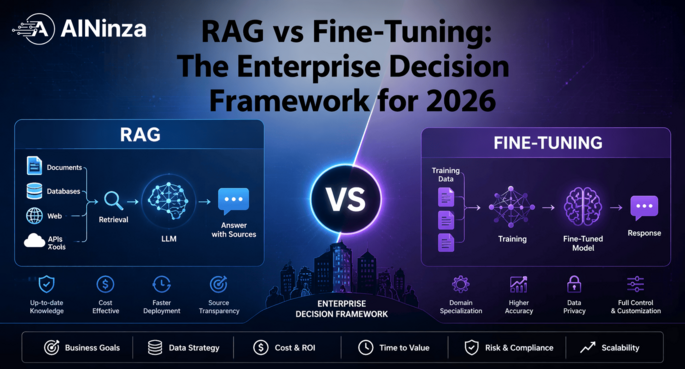
Most companies should use a hybrid approach. Buy the commodity infrastructure where it saves time, then customize retrieval logic, evaluation, and workflow integration around the business problem.
What metrics should leadership track during a RAG rollout?
Track time-to-answer, retrieval accuracy, citation quality, user trust, escalation rate, workflow cycle-time reduction, and cost per query or per user cohort.
Conclusion
A realistic RAG implementation timeline is not about how fast you can launch a demo. It is about how fast you can create a system that answers grounded questions, respects access boundaries, survives security review, and improves a measurable business workflow.
For most enterprise teams, that means a 30-60-90 day plan with disciplined scope. One workflow. One owner. One KPI chain. Tight evaluation. Staged rollout. No fantasy deadlines.
That approach is less sexy than “AI transformation in six weeks,” but it actually ships.
AINinza is powered by Aeologic Technologies, which helps enterprises design, build, and scale practical AI systems that survive contact with real operations. If you want a grounded roadmap for RAG, AI agents, or automation rollout, start here: https://aeologic.com/
References
- AWS, “2025 CDO Insights: Scaling Generative AI for Value” https://aws.amazon.com/data/cdo-report/
- AWS Partner Network, “New Generative AI Customer Research” https://aws.amazon.com/blogs/apn/new-generative-ai-customer-research-aws-partner-opportunities-in-the-evolving-generative-ai-landscape/
- Forrester, “Welcome to Jr. High, GenAI” https://www.forrester.com/blogs/welcome-to-jr-high-genai/
- BCG, “One Third of Companies Plan to Spend More than $25 Million on AI in 2025” https://www.bcg.com/press/15january2025-ai-optimism-autonomous-agents
- NIST, “Artificial Intelligence Risk Management Framework: Generative Artificial Intelligence Profile” https://www.nist.gov/publications/artificial-intelligence-risk-management-framework-generative-artificial-intelligence
- Stanford HAI, “AI Index Report 2025” https://hai.stanford.edu/ai-index/2025-ai-index-report
- IBM, “2025 Cost of a Data Breach Report: Navigating the AI rush without sidelining security” https://www.ibm.com/think/x-force/2025-cost-of-a-data-breach-navigating-ai
- Gartner, “How to Calculate Business Value and Cost for Generative AI Use Cases” https://www.gartner.com/en/documents/5188263
- BCG, “A Buy-and-Build Strategy Unlocks Greater Ops Tech Value” https://www.bcg.com/publications/2025/buy-and-build-strategy-unlocks-greater-ops-tech-value
- PwC, “2025 Global AI Jobs Barometer” https://www.pwc.com/gx/en/news-room/press-releases/2025/ai-linked-to-a-fourfold-increase-in-productivity-growth.html